Social Hub / Content Calendar Template
The Content Calendar Template
A free, ready-to-fill Google Sheet for planning a hair restoration practice’s Instagram, Facebook, and TikTok — with the medical-ad compliance check most templates skip.
Consistent, compliant, repeatable
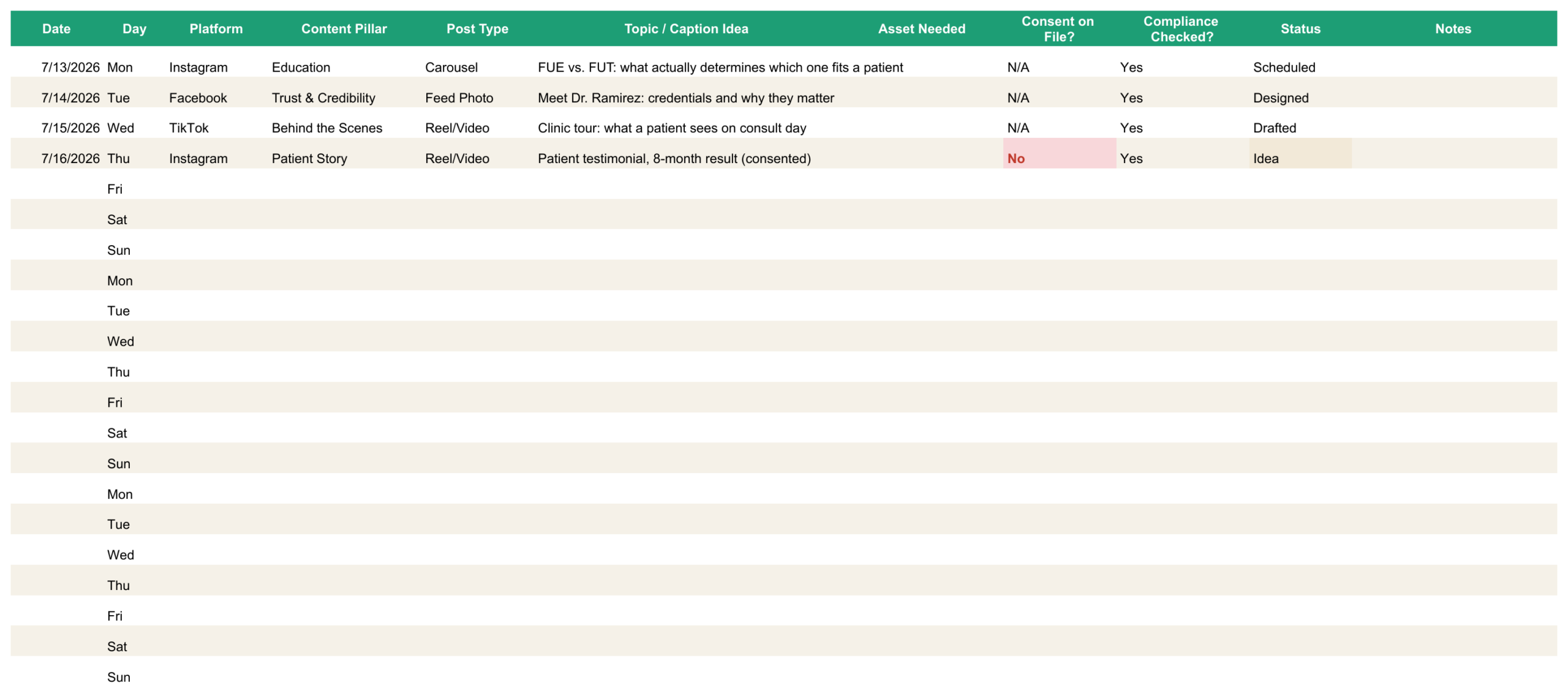
Your team knows the posts that need to go out this month — the consult-day walkthrough, the credential spotlight, the seasonal promo — but they’re living in three Slack threads and someone’s memory. Nothing gets batched or reviewed before it’s live, and a caption that reads harmless can trigger an ad account restriction none of you saw coming. This template gives your team one shared place to plan and sign off on every post — the calendar flags missing patient consent in red, and the Compliance Quick-Check catches what actually gets hair restoration accounts flagged. Make a copy, fill in three weeks, and you’re running a real operation instead of guessing.
Why professionals use a content calendar
Patients check before they book
Most patients scroll a practice’s feed before they ever call. A calendar is what keeps that feed from going stale between now and their next appointment.
The algorithm rewards consistency
Instagram, TikTok, and Facebook all favor accounts that post on a rhythm over accounts that post once and vanish. Planning three weeks at a time is what makes that rhythm realistic to keep.
Compliance gets checked before it’s a problem
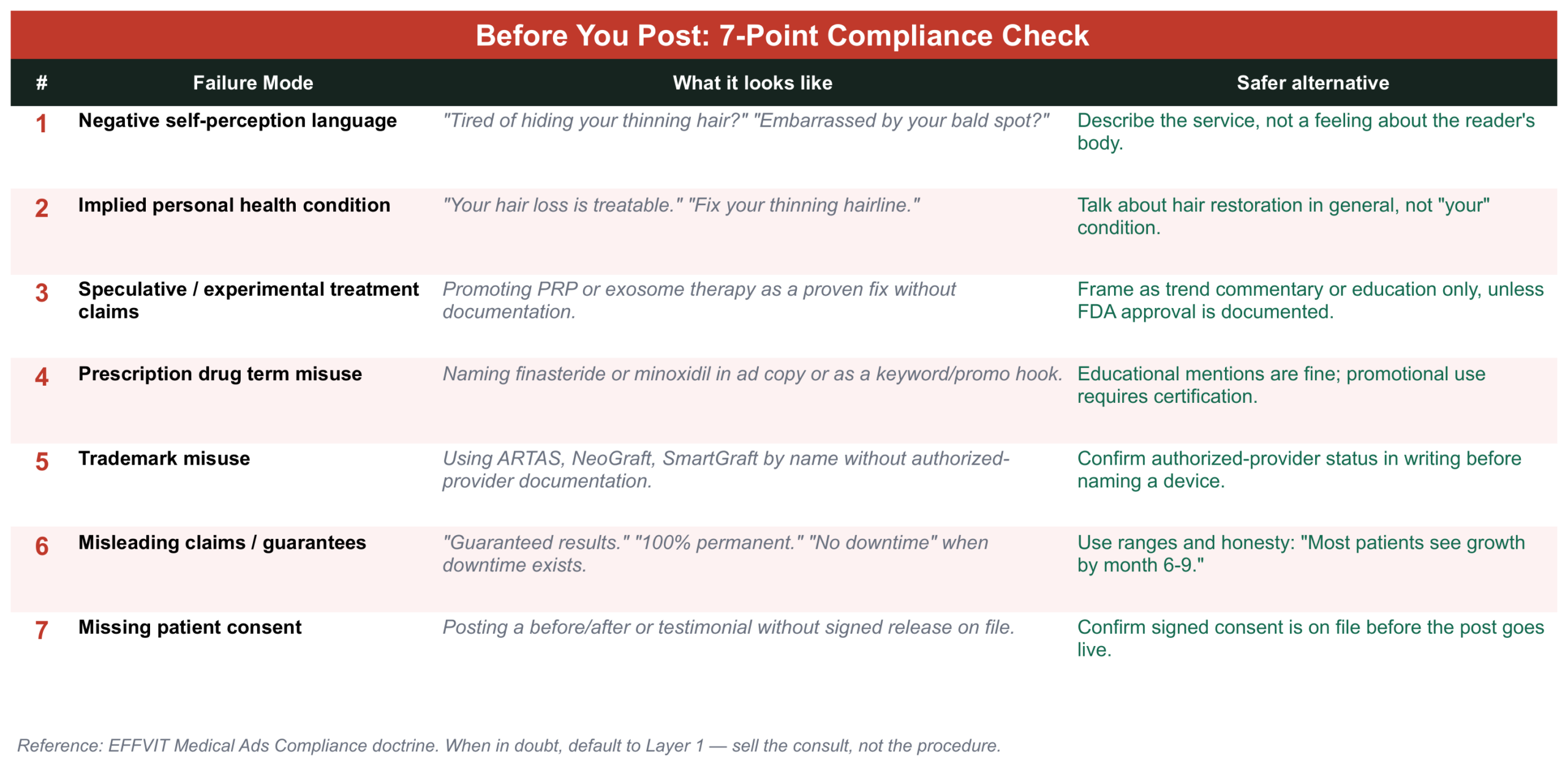
A post that reads as harmless — a before/after, a trademarked device name, a PRP claim — can trigger an ad account restriction. The Compliance Quick-Check tab catches the 7 most common mistakes before you hit publish, not after.
It’s built for handoff, not just for you
Whoever owns the calendar this month can hand it to whoever owns it next without re-explaining the plan. Status, consent, and compliance are all logged in the same row as the post.
What’s inside
Seven tabs, in this order — each one hands off to the next.
| Tab | What it’s for |
|---|---|
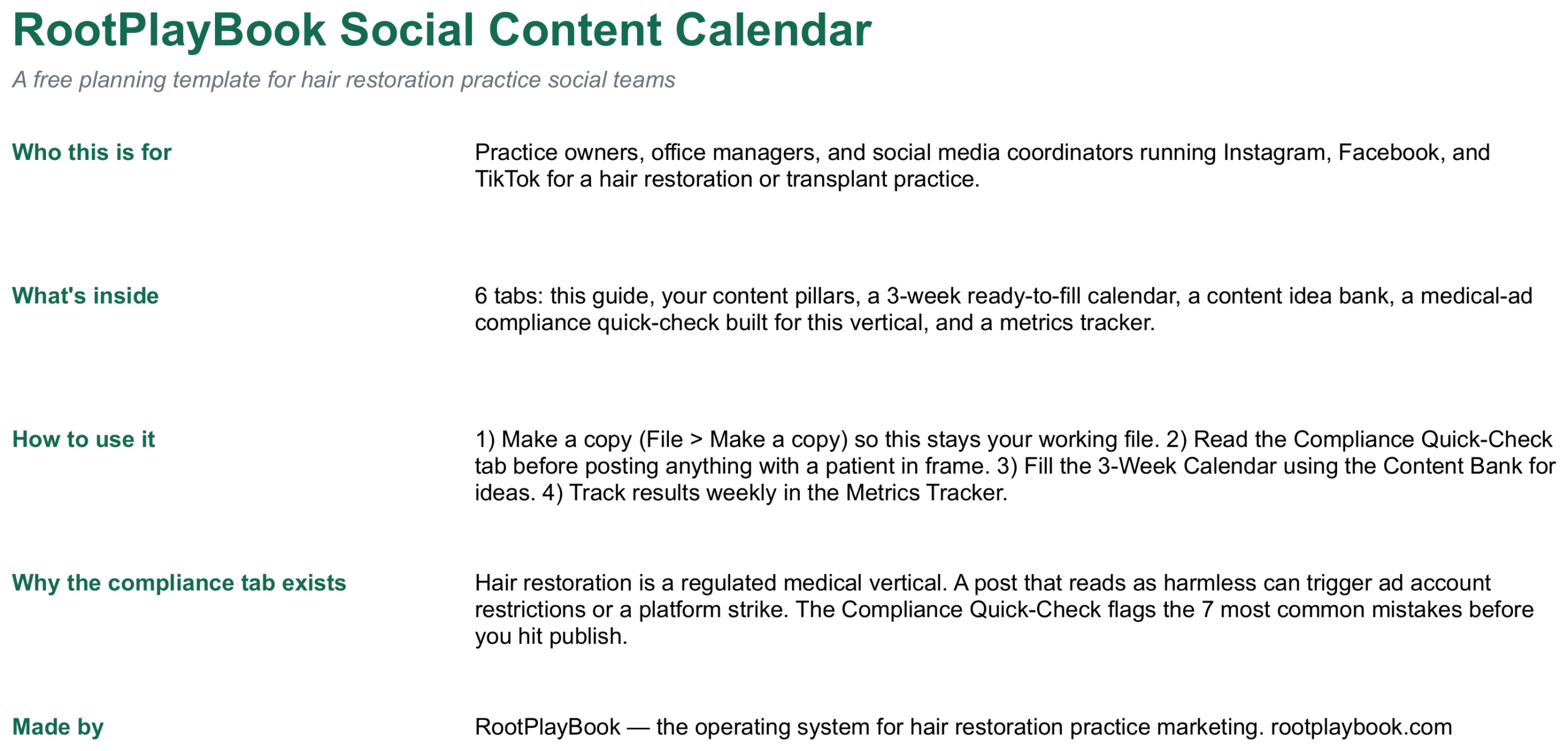
| Start Here | Quick orientation — who it’s for, how to use it, why the compliance tab exists. |
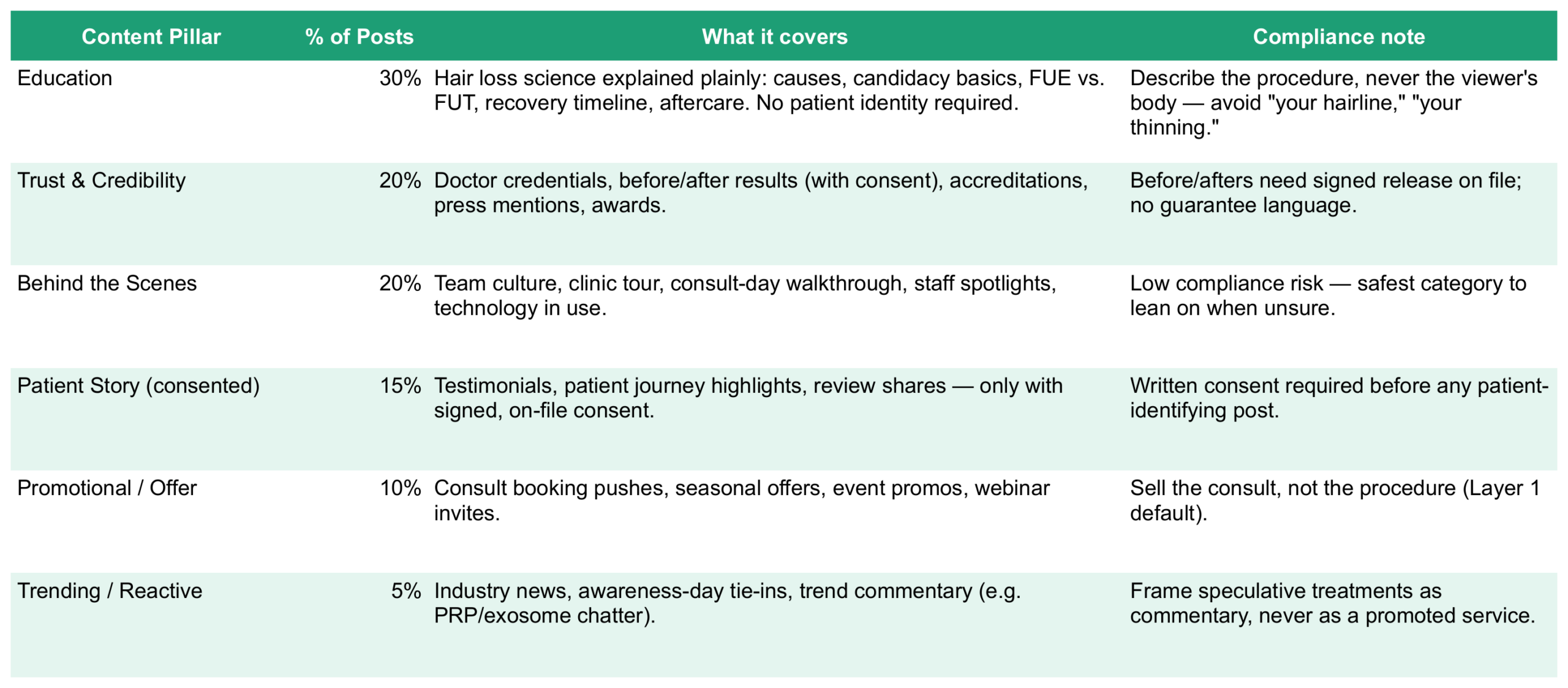
| Content Pillars & Mix | Your 6 content categories and the percentage split professionals recommend. |
| 3-Week Calendar | The working grid — platform, pillar, post type, consent, compliance, status. |
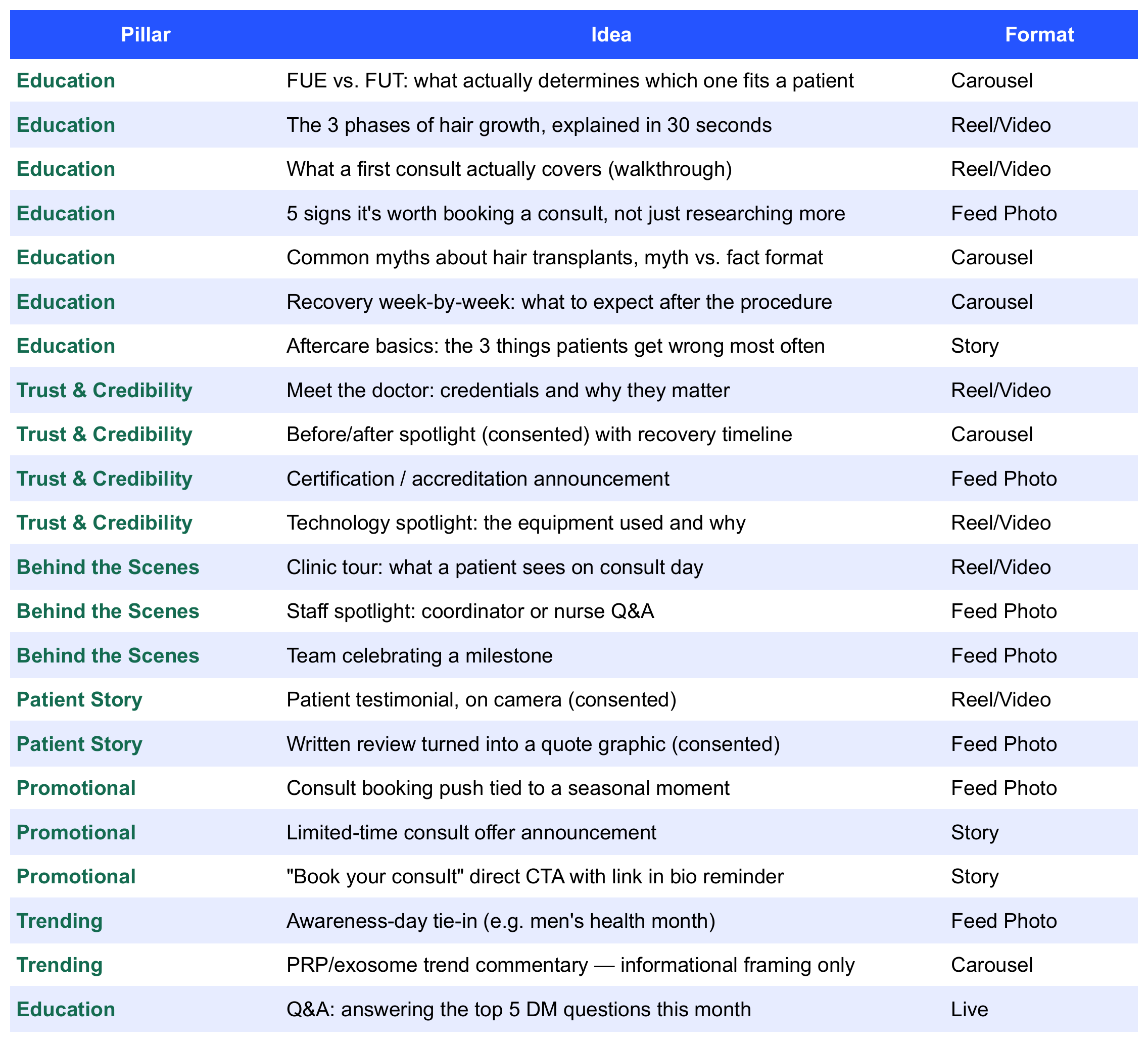
| Content Idea Bank | 20 ready-to-use post ideas, sorted by pillar. |
| Compliance Quick-Check | The 7 mistakes that get hair restoration accounts flagged, with safer alternatives. |
| Posting Times | Best times and days to post, by platform. |
| Metrics Tracker | Weekly reach, engagement, and consult-click tracking. |
How to use it
Get your copy
“Make a Copy” into your own Google Drive, or download the Excel version at the bottom of this page — both have all 7 tabs.
Read the Compliance Quick-Check tab first
Before anyone on your team posts anything with a patient in frame.
Set your content pillars
The Content Pillars & Mix tab already has the recommended split — adjust the percentages if your practice leans differently.
Fill the 3-Week Calendar
Pull ideas from the Content Idea Bank, and let the consent and compliance columns flag anything that needs a second look before it’s scheduled.
Track results weekly
Log reach, engagement, and consult clicks in the Metrics Tracker so you know what’s actually working.
See it in action
Every screenshot below is the actual template, filled in with a sample week — not a mockup.
Get your copy
Prefer Google Sheets? Open the link below, then go to File → Make a Copy. That saves a private, editable version straight into your own Google Drive — the shared original stays untouched. Prefer Excel? Use the download button instead — same 7 tabs, same formatting, no Google account required.
Most content calendar templates are generic. This one assumes you’re posting for a regulated medical practice — the compliance tab, the pillar mix, and the idea bank are all built for hair restoration, not a generic small business.
One more thing worth posting
Know a practice whose feed could use a system like this?
Refer them in and earn when they come on board.